It's super easy to add people to any photo!
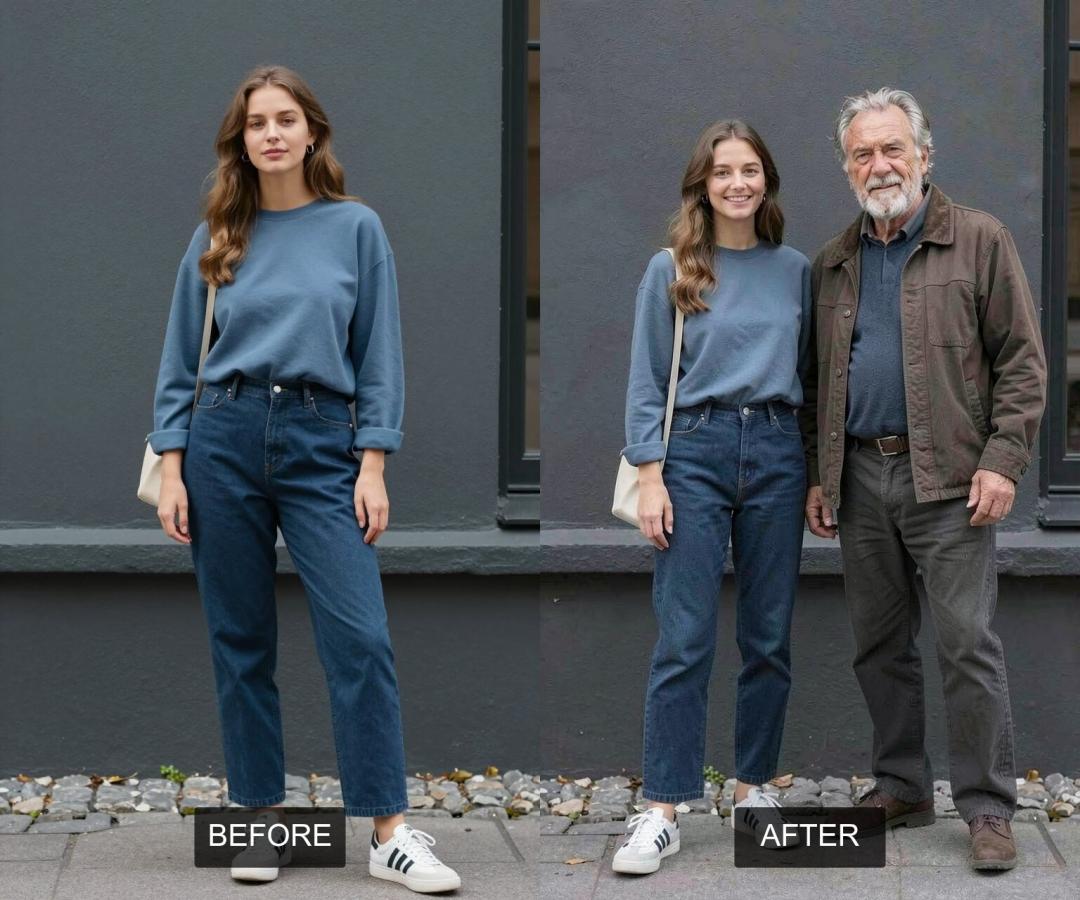
Imagine being able to place a friend, a family member, or even a completely new person into any photograph, making them look as if they were always part of the scene. Traditionally, adding a person to a photo required advanced photo editing skills, involving careful selection, perspective matching, lighting adjustments, and realistic blending, a process both time-consuming and often beyond the reach of casual users. However, with the advent of AI, this complex task has been simplified, making it accessible to everyone.
AiSudo's AI Add Person to Photo tool is designed to make this creative process straightforward. It allows you to integrate people into your pictures, giving them a fresh narrative without the need for extensive graphic design expertise or meticulous manual editing.
How to Add People to Your Photos with AI
To begin adding people to your photos, simply click the button above to open the AiSudo App 👆️
The AiSudo AI Add Person to Photo tool provides a simple way to add people to your pictures:
- Using reference images.
Adding People Using Reference Images
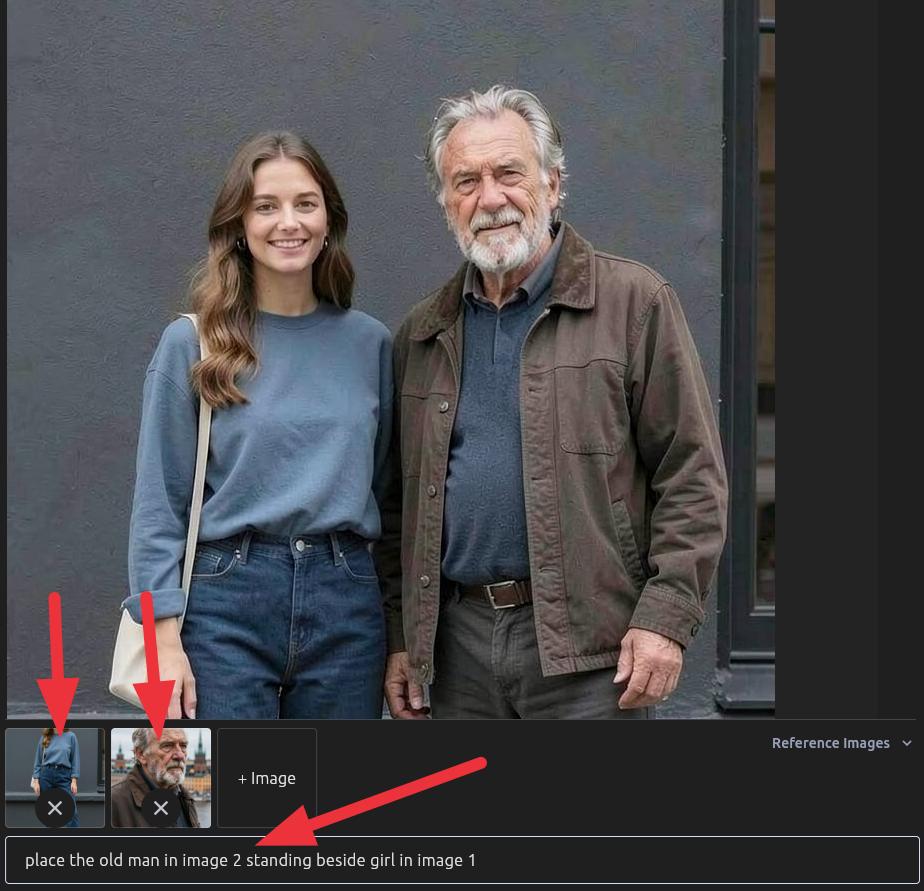
This method allows you to integrate a specific person from another image into your main photo.
- Upload Your Main Photo: First, upload the picture where you want to add a person to the Reference Images panel.
- Upload Your Reference Person Image: Next, upload an image that contains the specific person you wish to add.
- Type Your Prompt: Clearly instruct the AI to add the person from the reference image into your main photo. You can also specify their position or actions.
Here are some prompt ideas:
person in image 2 standing beside person in image 1
the man from image 2 walking in background behind girl in image 1
Prompt blueprint to adding person
[source] [action] [target]
[the man in image 2] [standing beside] [girl in image 1]
Tips for Using Reference Images:
Clarity is Key: For the best results, use reference images where the person is clearly visible, well-lit, and in a pose that can be naturally integrated into your main photo. Blurry or poorly lit reference images may not yield optimal outcomes.
Specify Placement: Be precise in your prompt about where you want the person to appear in the main photo (e.g., "on the left," "in the foreground," "behind the table").
Describe Interaction/Pose: If you want the added person to be doing something specific or in a particular pose, include that in your prompt (e.g., "sitting," "walking," "looking at the camera").
Consider Lighting and Perspective: While the AI does a great job, providing reference images that generally match the lighting and perspective of your main photo can lead to more realistic results.
Experiment with Prompts: If the initial result isn't perfect, try rephrasing your prompt with different details or instructions.
Multiple People: You can potentially add multiple people by uploading several reference images and specifying each addition in your prompt.
Key Features of AiSudo's AI Add Person to Photo Tool
AiSudo's AI Add Person to Photo tool helps you easily integrate individuals into your pictures. Here’s what it offers:
- Seamless Integration: Add people to photos with natural blending, matching lighting, shadows, and perspective.
- Reference-Based Addition: Use specific people from other images to populate your scenes.
- Prompt-Driven Control: Guide the AI with simple text descriptions to specify placement, pose, and appearance.
- Realistic Results: The added individuals look naturally part of the photo, as if they were there during the original shot.
- User-Friendly Interface: Easy to use for everyone, regardless of their editing skills. Upload, prompt, and generate.
- Fast Processing: Get high-quality results quickly, allowing for efficient photo manipulation.
- Versatile Applications: Ideal for creating group photos, adding missing family members, populating landscapes, or generating artistic compositions.
- Affordable Access: Benefit from 15 free credits daily (approximately 5 edits). Paid plans are available for more extensive use.
Frequently Asked Questions about Add Person to Photo App
What is AI Add Person to Photo?
It's an online tool that utilizes artificial intelligence to seamlessly integrate people into your existing photographs. You can add specific individuals from reference images, making them appear as if they were originally part of the scene.
How accurate is the AI in blending the added person?
The AI is designed to achieve a high level of realism. It analyzes the lighting, shadows, and perspective of your main photo to blend the added person naturally, making it difficult to distinguish them from the original elements of the image.
Can I add multiple people to one photo?
Yes, you can add multiple people to a single photo. You would typically upload multiple reference images (one for each person you want to add) and then provide clear instructions in your prompt for each individual's placement and appearance.
What if the AI doesn't place the person exactly where I want them?
AI models learn continuously. If the initial placement isn't perfect, try refining your prompt by being more specific about the desired location (e.g., "to the far left," "in the background, slightly to the right," "sitting on the chair"). Experiment with different descriptive terms. Remember, you have daily free credits to fine-tune your results!
Can I add a girl in a photo in AI?
Yes, Our AI tool can add a girl (or any person) to your photo. Just make sure to provide a clear reference image of the girl you want to add, and then use your prompt to specify where you'd like her placed in your main photo. For example, you could say: "Add the girl from image 2 standing by the window."
Can AI put two people in a photo together?
Yes, Our AI Add Person to Photo tool is designed to do just that. You can easily integrate two (or more!) people into a single photo, making them look like they were always there. You just need to upload your main photo and then upload images of the people you want to add as references. Then, use a simple prompt to tell the AI where you want them placed. For example, you could say, "Add the person from image 2 and the person from image 3 into the background." The AI will blend them naturally, matching the lighting and perspective.