Instant Clothes Swap
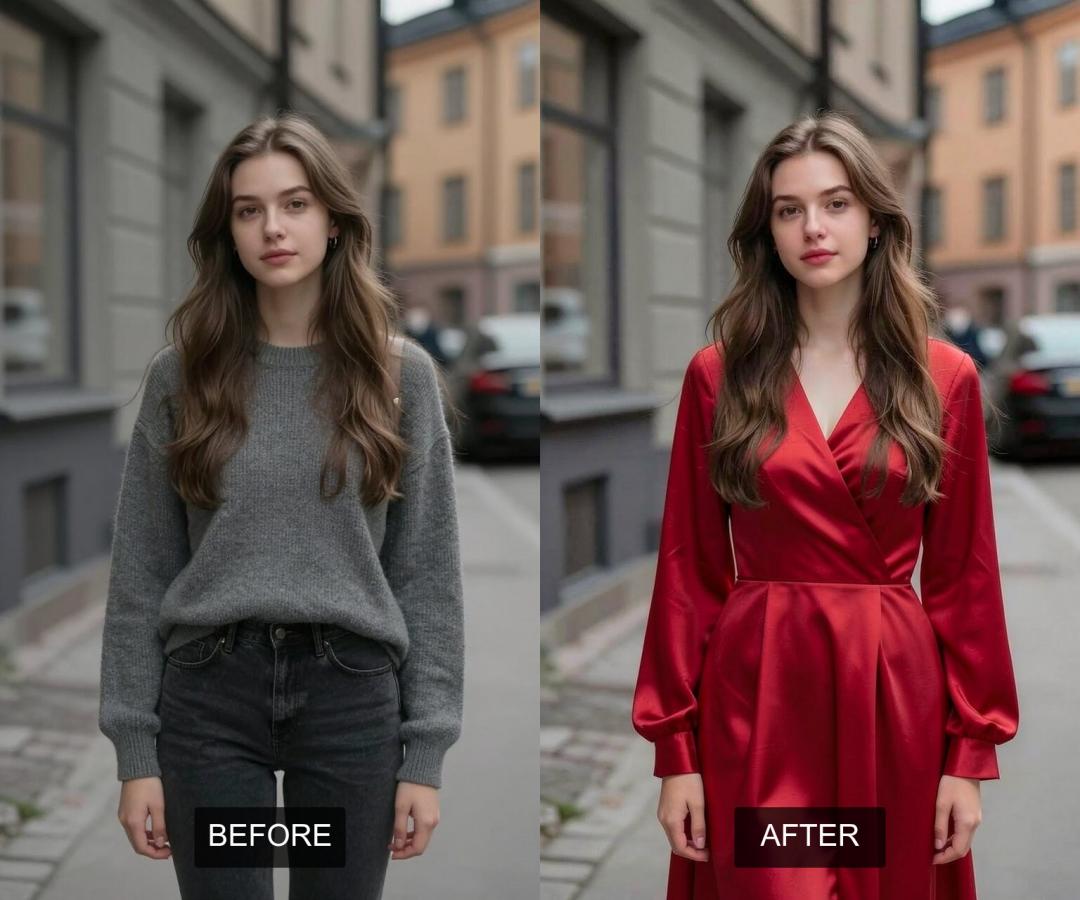
Imagine being able to easily change the dress in any photo, adjusting colors, styles, and even fabrics with just a few clicks. Normally, editing clothes in photos takes a lot of skill and time because you have to carefully select areas, match colors, and blend textures realistically. But now, with AI, this difficult task has become super simple and easy to use.
AiSudo's AI Photo Clothes Changer is made to make this creative process easy. It lets you change outfits in your pictures, giving them a fresh look without needing advanced graphic design skills or tedious manual editing.
How It Works
To start changing clothes in your photos, just click the button above to open the AiSudo App 👆️
The AiSudo AI Photo Dress Changer gives you two simple ways to change dress in your pictures:
- Using prompts.
- Using reference images.
Change Clothes Using Prompts
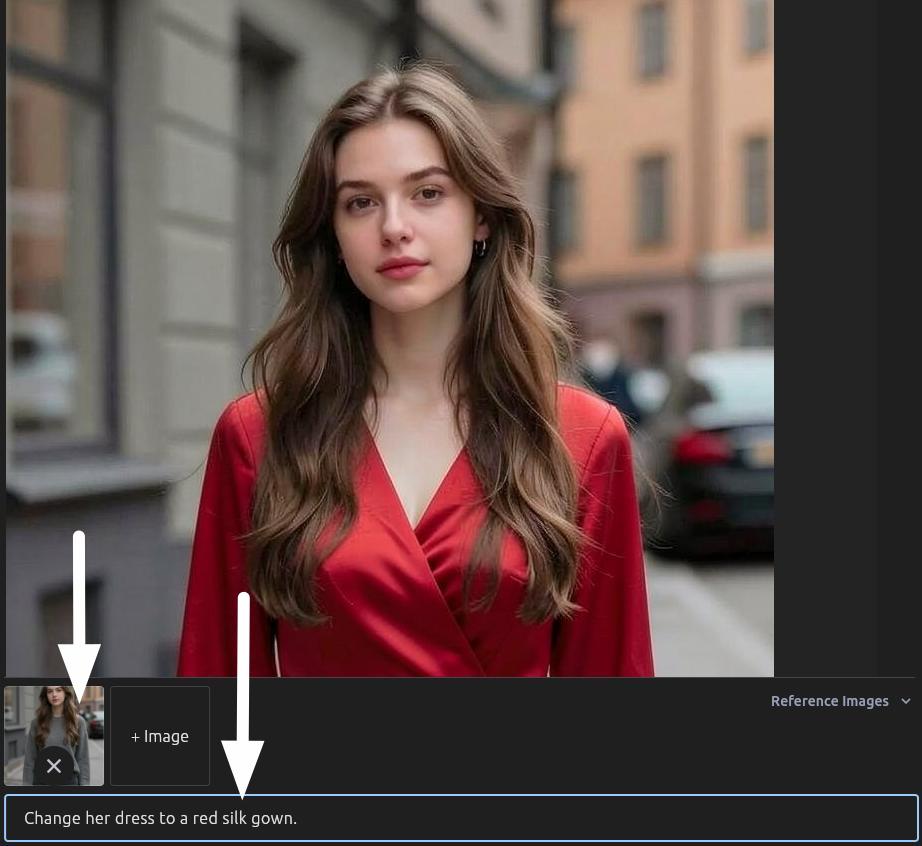
This method lets you describe the clothing changes you want using everyday language.
- Upload Your Image: First, upload the photo you want to change to the Reference Images panel.
- Type Your Prompt: Clearly describe the new clothes, including details like color, style, and material. The AI will understand what you want and create the updated image.
Here are some prompt ideas:
Change clothes to a red shirt and black jeans.
Give her a black leather jacket and blue jeans.
Replace the shirt with a vintage floral blouse.
Tips for Using Prompts:
Include details about color, style, material, and patterns. The more specific you are, the better the AI can understand what you want.
Write simple, direct descriptions. Avoid complex sentences or ambiguous terms.
If you need multiple changes, try focusing on one clothing item per prompt for better results.
If there are more than 1 person, specify who you're changing if the image has multiple people (e.g., "Change the woman on the left to a blue dress").
You can mention keeping certain items unchanged (e.g., "Keep the shoes, but change the shirt to a white t-shirt").
If the first result isn't perfect, try rephrasing your prompt or adjusting your description.
Swapping Clothes with Another Picture
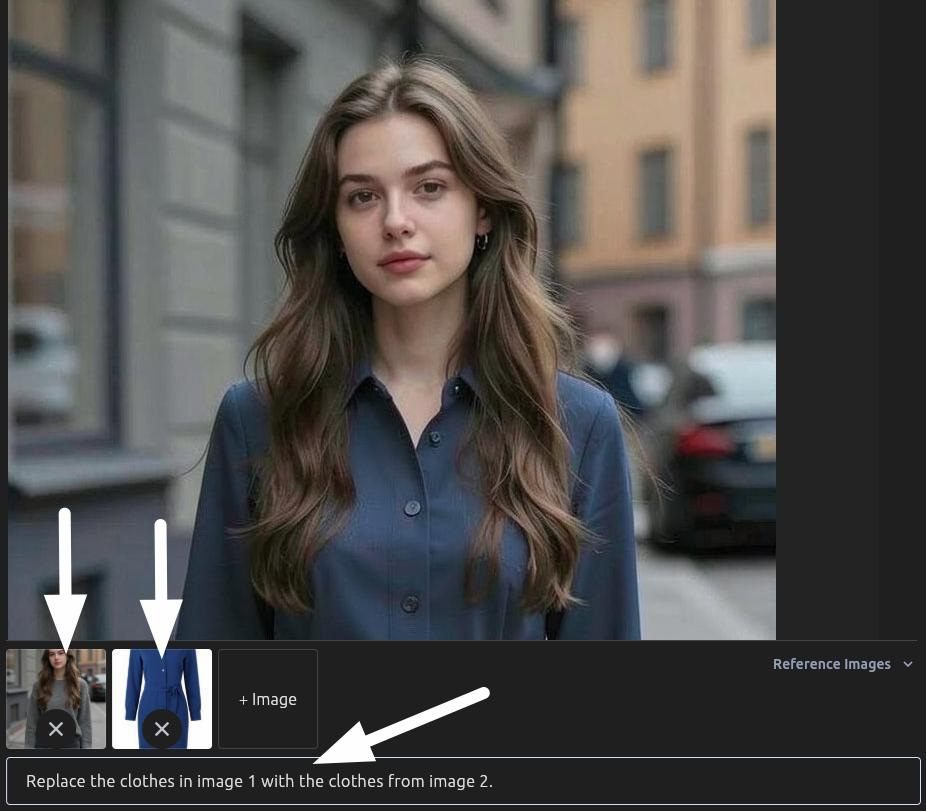
If you have a specific piece of clothing from another image in mind, this method lets you transfer it precisely.
- Upload Your Main Photo: Upload the picture where you want to change the outfit.
- Upload Your Desired Clothing Reference: Next, upload an image that has the specific clothing item you want to put on your main photo.
- Type Your Prompt: Tell the AI to replace the clothes in the first image with the clothes from the second.
Here are some prompt ideas:
Replace the clothes in image 1 with the clothes from image 2.
Change the outfit in image 1 to match the style in image 2.
Put the dress from image 2 onto the person in image 1.
Tips for using reference images:
You can upload multiple reference images to mix and match different clothing items. For example, you could combine a red dress from one image with blue jeans from another and white shoes from a third.
For best results, use reference images where the clothing item is clearly visible and well-lit. Dark or blurry images may not transfer as accurately.
The AI works best when the person in your main photo and the clothing in your reference images have similar poses and angles.
If you're not getting the result you want, try adjusting your prompt to be more specific. Mention colors, patterns, or exact clothing items (e.g., "Put the striped blue sweater from image 2 onto the person in image 1").
Key Features of AiSudo's AI Photo Clothes Changer
AiSudo's AI Photo Clothes Changer helps you easily change outfits in photos. Here’s what it offers:
- Easy Clothing Changes: You can change clothes with a few clicks or by typing a description.
- Text-Based Customization: Describe the outfit you want (e.g., "a red silk gown" or "a vintage floral blouse"), and the AI will create it.
- Reference Image Swapping: You can transfer clothes from one photo to another.
- Realistic Results: The new outfits look natural in the photo, matching textures, lighting, and folds.
- Simple to Use: Upload your image, type your request, and the AI does the work. No editing experience needed.
- Fast and Efficient: Get good results quickly, allowing you to edit many images.
- Many Uses: Good for personal style, fashion design, product variations, and more.
- Affordable: You get 15 free credits daily (about 5 edits). Paid plans are available if you need more.
Frequently Asked Questions
What is AI Photo Clothes Changer?
It's an online tool that uses artificial intelligence to easily change the clothes of subjects in your photos. You can alter styles, colors, and fabrics with just a few clicks, without needing advanced editing skills.
What kind of results can I expect?
AiSudo aims to provide professional-looking results. For the best outcome, we recommend using high-quality, well-lit input images and being specific with your prompts.
Can I customize my outfit and styles?
Sure! With our free AI outfitting changer, you can design your own outfit. Just describe your dream look with simple words, and then you can see how it looks on you. Therefore, you can use it to alter styles and explore color or fabric variations to fit your taste.
What if the AI doesn't get it right on the first try?
AI models are continuously learning. If you don't get the desired result immediately, try refining your prompt, being more specific, or attempting a different approach. Remember, you have daily free credits to experiment!
Can I use the result images for commercial purposes?
Yes, as long as you have the copyright for the models and clothes in the images you've uploaded, you're free to use them for any purpose, like for your e-commerce store, social media posts, marketing materials, or anything else really.
Start transforming your wardrobe with AiSudo's AI Photo Clothes Changer today. It's easy, fast, and free to try!