Awesome Emoji Removal Tool!
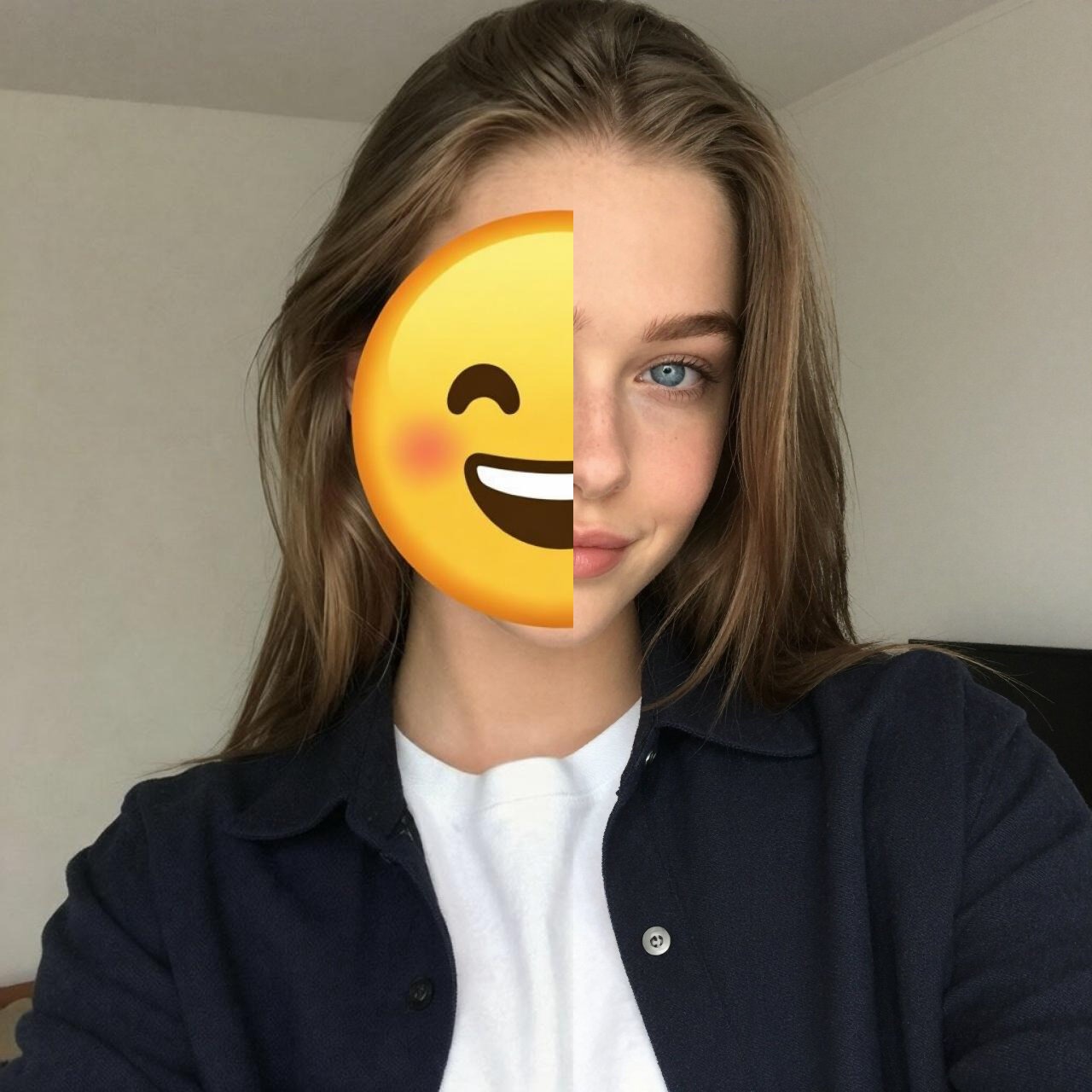
Ever see a cool photo online, but an emoji is blocking something important, like someone's face? Super annoying, right? Usually, getting rid of emojis or other stuff in photos without leaving a weird trace used to need fancy software and a ton of skill. You'd have to carefully copy parts of the picture, blend colors, and try to guess what was hidden, and it often didn't look great.
But guess what? Thanks to AI, this tough job is now super easy! AiSudo's AI Emoji Remover is here to make it simple for everyone. You can easily get rid of emojis and other annoying things from your pictures, and it'll naturally bring back whatever was hidden. No need to be a graphic design pro!
How It Works
To start cleaning up your photos, just hit the button above to open the AiSudo App! 👆️
The AiSudo AI Emoji Remover gives you two easy ways to fix your pictures:
- Using simple text instructions.
- Using another picture as a guide.
1. Remove Emojis Using Text Instructions
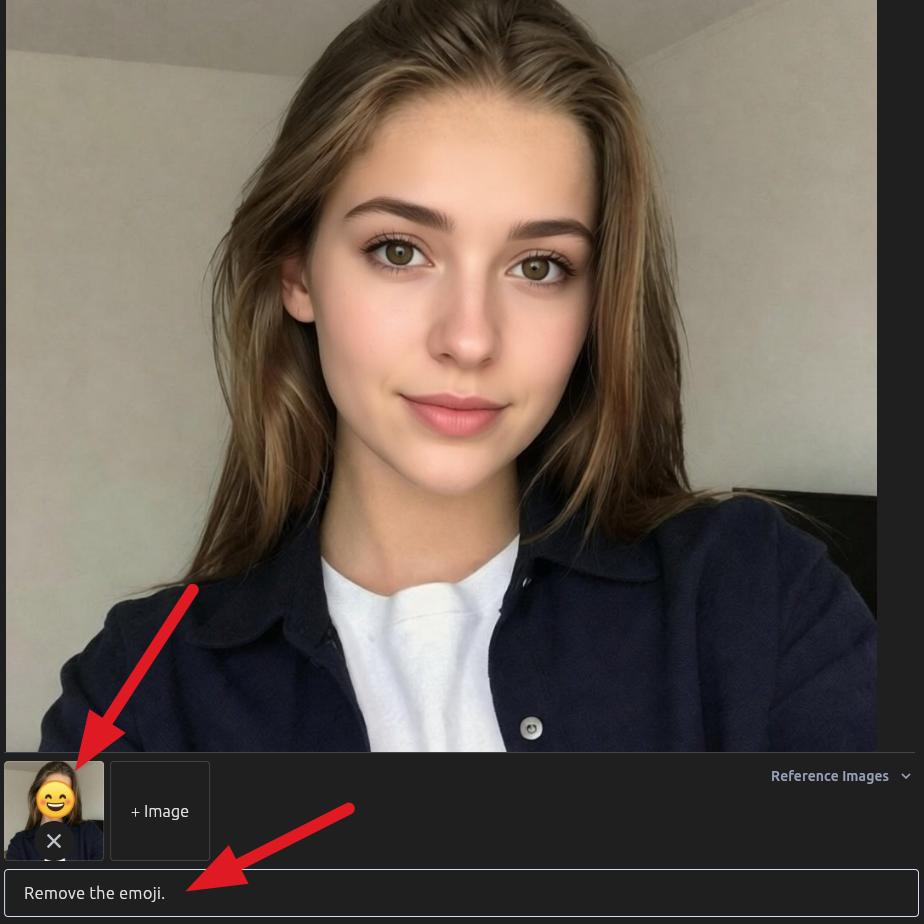
This way, you just tell the AI what you want removed using everyday words.
- Upload Your Picture: First, put the photo you want to fix into the Reference Images panel.
- Type What You Want: Clearly tell the AI what you want it to remove. The AI will understand and naturally bring back that hidden area.
Here are some ideas for what to type:
Remove the emoji.
Get rid of the face emoji.
Take the sticker out of the picture.
Tips for Using Text Instructions:
Be clear and to the point. Short phrases like "Remove the emoji" or "Delete the sticker" usually work best.
If there are a few emojis, you can say which one (e.g., "Remove the emoji on the left person's face").
If the emoji is covering something specific, you can mention it (e.g., "Remove the emoji covering the car").
If the first try isn't perfect, try saying it a different way or adding more details.
Note: The resulting face might look different from the real person when using this method because the AI model hasn't been trained with that person's face. For better accuracy, try the second method below.
2. Removing Emojis with a Guide Picture
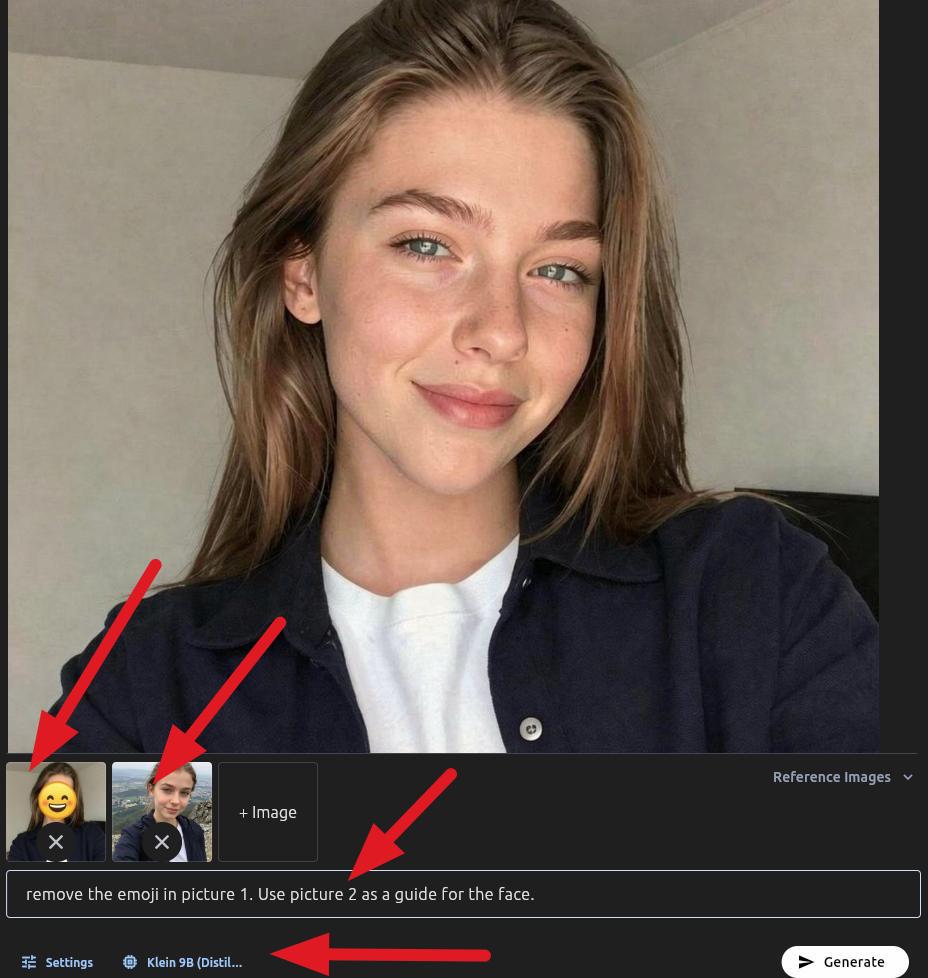
If you have another picture that shows what the hidden spot should look like, this method can help the AI do an even better job.
- Change the AI model to the Klein Model. The P-Image Edit model currently has a problem with this specific method.
- Upload Your Main Photo: Put the picture with the emoji you want to remove here.
- Upload Your Guide Picture: Next, upload a picture that gives the AI a hint about what's under the emoji (like another photo of the same person without the emoji, or a similar background).
- Type What You Want: Tell the AI to use the guide picture to fill in the missing parts.
Here are some ideas for what to type:
Remove the emoji from picture 1 and use picture 2 to fix that spot.
remove the emoji in picture 1. Use picture 2 as a guide for the face.
Tips for using guide pictures:
The guide picture doesn't have to be perfect, but it helps if it has similar lighting, angles, or things in it as the area under the emoji.
For the best results, make sure the guide picture clearly shows the details you want back.
The AI will cleverly combine info from both pictures to make it look seamless.
If it's not working out, try changing what you typed to be more specific about how the guide picture should be used.
Cool Stuff AiSudo's AI Emoji Remover Can Do
AiSudo's AI Emoji Remover makes cleaning up your photos a breeze. Here's what it offers:
- Easy Emoji Removal: Get rid of any emoji or sticker from your photos quickly, with just a few clicks or a simple text command.
- Smart Fixes: The AI doesn't just cut out the emoji; it smartly looks at the pixels around it and rebuilds the hidden areas naturally, so it looks like the emoji was never there.
- Tell It What To Do: Just use everyday words to describe what you want removed or how you want the area fixed.
- Looks Real and Smooth: The fixed areas blend in perfectly with the rest of your picture, matching textures, colors, and light for a natural look.
- Simple to Use: Just upload your picture, type your request, and let the AI do all the hard work. No fancy editing skills needed!
- Fast and Efficient: Get great results quickly, so you can fix lots of pictures in no time.
FAQs
What exactly is an AI Emoji Remover?
It's an online tool that uses smart AI to automatically find and take out emojis or stickers from your photos. Then, it cleverly rebuilds the hidden parts of the picture, making it look complete and natural.
Is it possible to remove face emojis from photos and reveal the face?
You can only do this if you have another reference photo of the face. Otherwise, the AI will replace the face with a generic one it was trained on. Use the reference image method if you want the result to be as close as possible to the original face.
What's the general process for removing emojis from a picture?
Generally, to remove emojis from a picture, you'd use an AI-powered tool. These tools usually let you either describe what you want removed with a text prompt (like "remove the heart emoji") or, for even better results, you can provide a reference image to help guide the AI in reconstructing the hidden area more accurately.
How do I get rid of an emoji from a picture to get the original image back?
Upload your image to our tool, then type something like "Remove the emoji." The AI will process it, erase the emoji, and use smart tech to rebuild the original background or object, giving you a version closer to how it was originally.
What if the emoji is covering something important, like text or a person's eye?
Our AI is designed to handle this! While it's incredibly good at reconstructing, the accuracy can depend on how much of the original content was covered and the complexity of the background. It uses advanced algorithms to predict and fill in the missing information, often with impressive results.
Is using an AI Emoji Remover free?
AiSudo's offer free trials: 15 free credits daily (approximately 5 edits). Paid plans are available for more extensive use.
Start cleaning up your photos and discovering hidden details with AiSudo's AI Emoji Remover today. It's easy, fast, and free to try!