Erase Text from Any Photo with Ease!
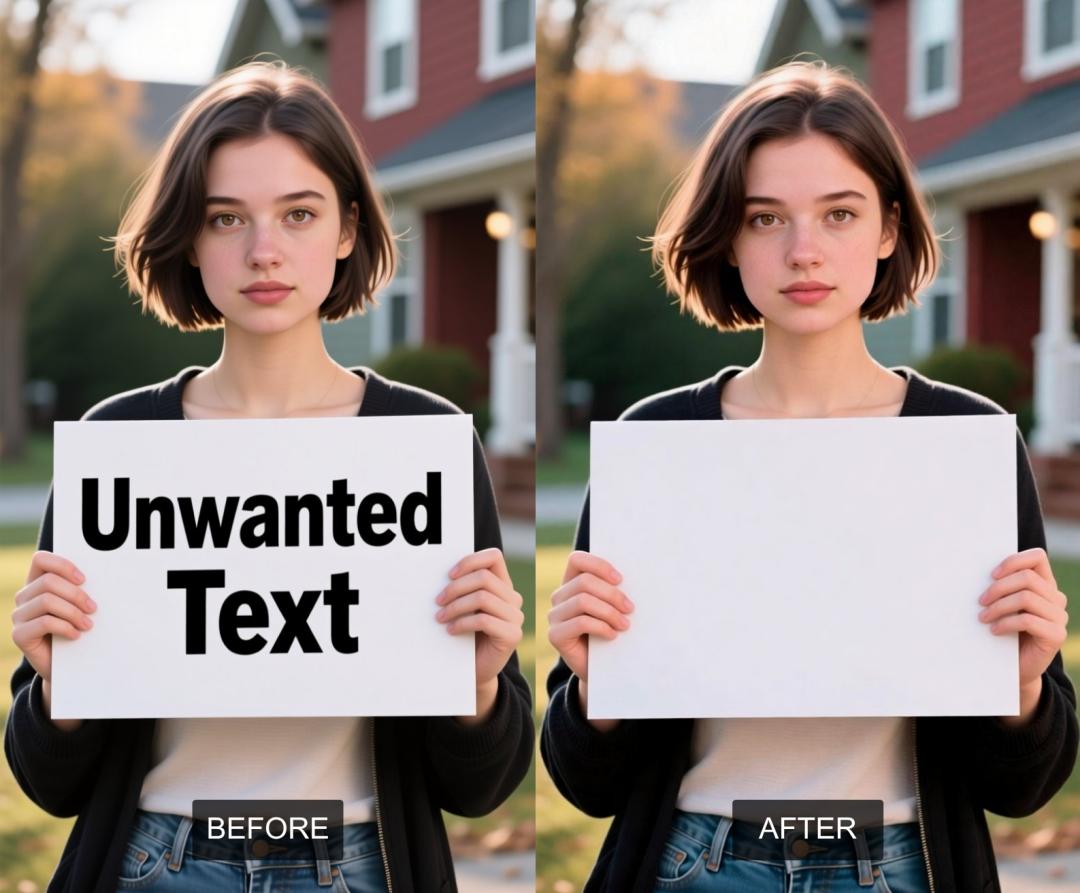
Ever find a perfect picture, only to see it ruined by some unwanted text like a watermark, a date, a caption, or an ad? Back in the day, getting rid of these meant messing with complicated photo editing software, which took a lot of skill and often didn't even look that good. But what if you could just make that text vanish like it was never there?
AiSudo's AI Text Remover from Image tool brings a touch of digital magic to this common problem. It's designed to effortlessly erase text from your pictures, leaving behind a clean, natural background, without the need for advanced graphic design skills or endless hours of manual touch-ups.
How to Remove Text from Your Images with AI
To begin removing text from your photos, simply click the button above to open the AiSudo App 👆️
The AiSudo AI Text Remover from Image tool provides a straightforward way to clean up your pictures:
- Using a simple prompt.
Removing Text Using a Prompt
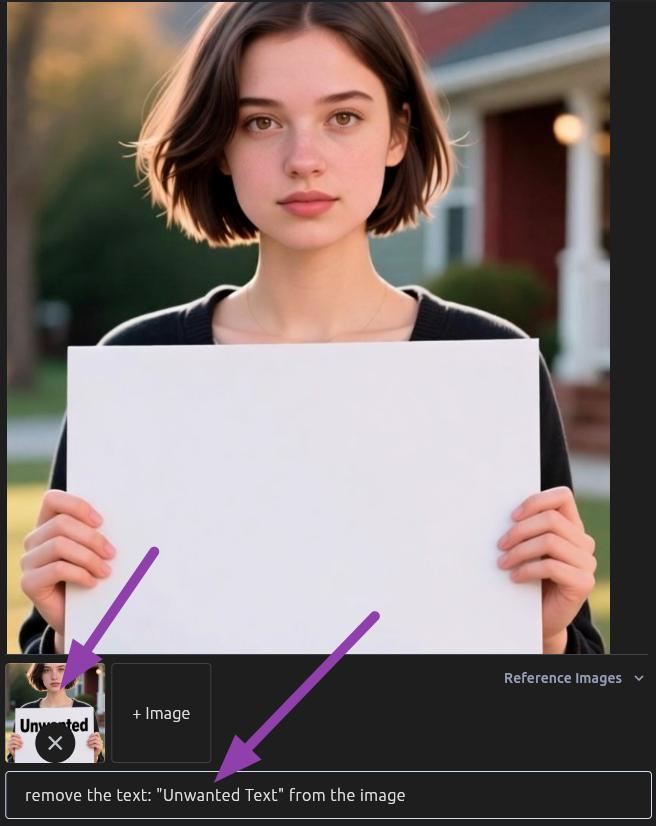
This method allows you to instruct the AI directly to erase the text you want removed.
- Upload Your Image: First, upload the picture that contains the text you wish to remove.
- Type Your Prompt: Clearly instruct the AI to remove the text. You can be general or specific.
Here are some prompt ideas:
remove the text from the image
delete the watermark from the bottom right corner
erase the date stamp
remove all text
Prompt blueprint to remove text
[action] [target] [location (optional)]
[remove] [the text] [from the image]
Tips for Removing Text:
- Be Specific if Needed: If there's multiple text on an image and you only want to remove one, describe it clearly in your prompt (e.g., "remove the red text," "delete the small text at the top").
- Clarity is Key: Even a simple prompt like "remove text" often works wonders, as the AI is trained to identify and eliminate text elements.
- Experiment with Prompts: If the initial result isn't perfect, try rephrasing your prompt with different instructions. Sometimes, a slight change in wording can yield better results.
- Focus on the Background: The AI's strength lies in intelligently filling in the area where the text once was, blending it with the surrounding background.
Erasing Text with an Edit Overlay
This method lets you directly select text on an image and have the AI redraw that specific area.
- Upload Your Image:
First, get the picture you want to remove text from.
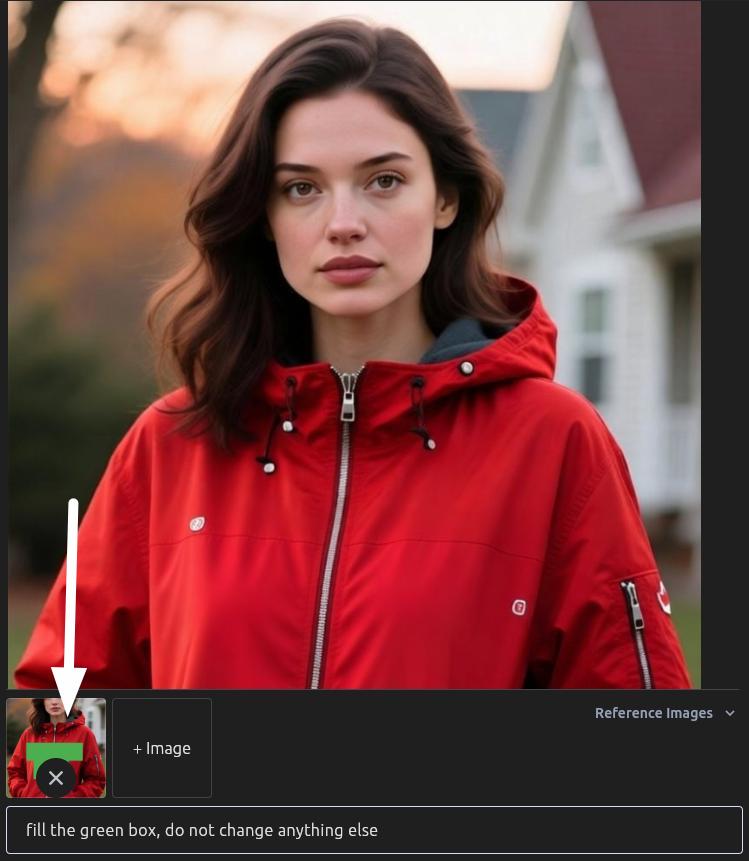
Then select the uploaded image to start marking the unwanted text.
- Highlight the Text Area: Mark the text you want gone.
Pro Tip: Use a color that isn't already in your image. This helps the AI easily spot what you want to change.

- Give Your Prompt: Tell the AI exactly what to do with the marked area. Be specific about colors and shapes.
Here are a couple of prompt ideas:
"fill the green box"
"redraw the red circle"
Key Features of AiSudo's AI Text Remover from Image Tool
AiSudo's AI Text Remover from Image tool is crafted to make tidying up your photos effortless. Here’s what it offers:
- Effortless Text Removal: Instantly eliminates any unwanted text, whether it's watermarks, dates, captions, or other overlays.
- Intelligent Background Reconstruction: The AI doesn't just cut out the text; it intelligently analyzes the surrounding pixels to seamlessly fill in the erased area, restoring the background naturally.
- Prompt-Driven Simplicity: Guide the AI with simple text descriptions. Just tell it what text to remove, and it does the rest.
- Natural and Realistic Results: The removed text leaves no trace, and the reconstructed background integrates smoothly, making it appear as if the text was never there.
- User-Friendly Interface: Designed for everyone, regardless of their photo editing experience. Upload your image, type your prompt, and get your clean picture.
- Fast Processing: Get high-quality, text-free images quickly, allowing for efficient photo cleanup.
- Versatile Applications: Perfect for photographers, marketers, social media users, or anyone needing to clean up an image for personal or professional use.
- Affordable Access: Benefit from 15 free credits daily (approximately 5 edits). Paid plans are available for more extensive use.
Frequently Asked Questions about Text Remover from Image App
How do I remove text from a picture using this tool?
Simply upload your image to the AiSudo Text Remover tool. Then, in the prompt box, type a clear instruction like "remove the text" or "delete the watermark." The AI will process your request and provide you with a clean image.
Can I remove text from an image without blurring the picture?
Absolutely. Our AI Text Remover tool is specifically designed to remove text cleanly and smoothly, without introducing blurriness or artifacts to the rest of your image. It focuses only on the text area and intelligently reconstructs only that specific part.
Does this tool work for all types of text, like watermarks or date stamps?
Yes, it is effective for removing various types of text, including watermarks, date stamps, captions, embedded logos with text, and any other unwanted textual overlays.
Can I erase text from a picture and maintain the original background details?
Yes, that's one of the primary benefits of our AI tool. It excels at analyzing the existing background information and intelligently generating realistic pixels to seamlessly fill in the areas where text was removed, preserving the original background details as much as possible.
What if the text is really complicated or blends a lot with the background??
While the AI is powerful, very complex text mixed into detailed backgrounds might need more specific instructions or a few tries. However, the tool is usually very effective even in tough situations, and it will rebuild the background as well as it can.